
Saving a connection
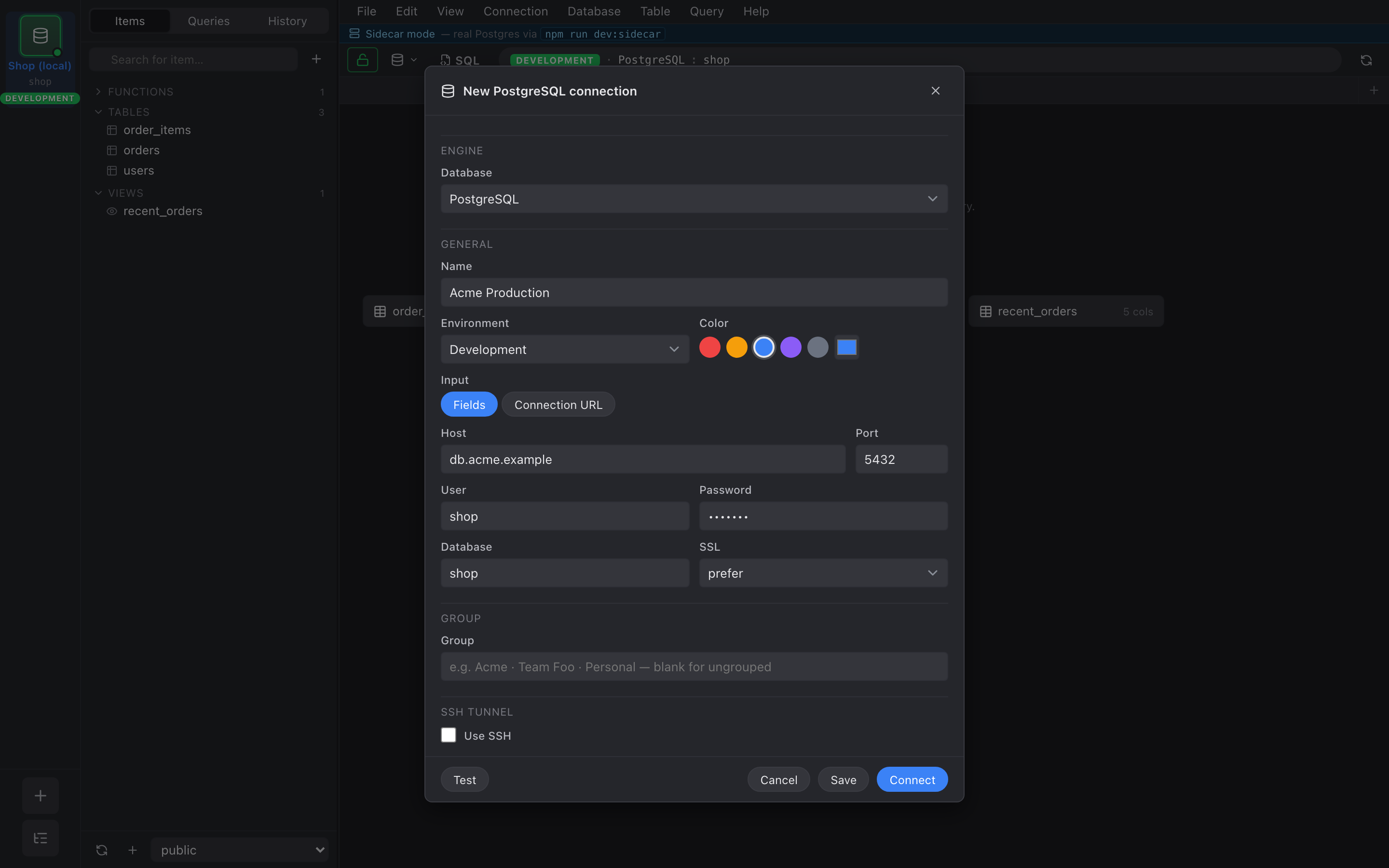
The connection form (⌘N or + New connection anywhere) is one dialog with sections for General, Group, Environment, and SSH tunnel.
Fields that matter
Section titled “Fields that matter”- Name — what you’ll see in the rail and recents.
- Host / Port / User / Password / Database — standard.
- SSL mode —
disable,prefer(default),require. - Environment — drives the avatar tint and the destructive
confirmation flow. Production gets red; the editor refuses to
DROP TABLEon it without you typing the connection name. - Group — free text. Connections with the same string land in the same section of Manage Connections….
- SSH — covered in SSH tunneling.
Test before saving
Section titled “Test before saving”Click Test connection to verify host + auth without persisting the record. On success you get an “ok in N ms” badge; on failure the exact server message.
Where the password lives
Section titled “Where the password lives”- Desktop build — OS keychain via the
keyringcrate (macOS Keychain, Windows Credential Manager, libsecret on Linux). - Browser dev build — localStorage on the dev origin. Don’t point this at a production database.
The SQLite metadata file at app_data_dir()/metadata.db holds the
rest (host, port, group, environment, color) but never holds
secrets directly.